


Google Tasks
4.626.06K Reviews
App Specs
- Version
- Varies with Device
- Updated On
- License
- Free
- Downloads
- 10,000,000+
- Developer
- Google LLC
- Categories
- Productivity
- Platform
- Android, iOS
Screenshots
 Analysis by AppCompare
When a household shares a busy calendar, the problem is often less about remembering every chore than knowing which account holds the reminder. I find Google Tasks most useful as a personal, lightweight list: it helps me keep errands, work follow-ups, and small plans visible without turning task management into another project. That distinction matters at home, where a tidy list can help one person stay organized but does not automatically become a shared family plan.
A small list for a busy day
A practical routine is to capture tasks as they arise, then give only the ones with real deadlines a due date. For example, after spotting a message about a school form, I could turn the follow-up into a task, set a date, and check it alongside the rest of my day. The benefit is not a complicated household command center; it is having a clear next action that I can find again when I have a spare moment.
That approach works especially well for recurring kinds of mental clutter: groceries to pick up, a call to make, a bill to review, or something to bring on an outing. I would keep the wording specific—“buy printer paper” is easier to act on than “office stuff”—and use subtasks when one job has a few distinct steps. If a list starts to become a storage place for every vague idea, I would spend a minute deciding what actually needs doing rather than adding more detail for its own sake.
Keep household accounts clear
On a shared device, I would first check which Google account is active before adding anything personal. A family tablet may be used by several people, but a task list tied to an account should be treated as belonging to that account, not as a communal noticeboard. That simple boundary avoids mixing a parent’s work follow-ups with a child’s reminders or another adult’s errands.
For coordination, I would agree on a clear handoff outside the list itself: one person adds their own reminder, then tells the person responsible when a task needs to be shared. The app’s connection with Google services can make an individual workflow convenient, but convenience should not be mistaken for a shared assignment system. If everyone needs to see, claim, and update the same household jobs, a service built around shared lists may suit the group better.
Who benefits from the simple approach?
I would recommend this style of task tracking to someone who already uses Google services and wants a low-friction place for personal actions. It is a good fit for a student keeping track of study steps, a parent remembering errands, or a worker collecting follow-ups from email. The app is free, and Google LLC develops it as a productivity tool; its broad appeal is reflected in a 4.6 average from around 578,000 ratings and over 10 million installs.
It is also sensible for households where each adult prefers to manage their own reminders rather than maintain a shared chore board. For children, I would keep the setup age-appropriate and make sure they understand which account they are using. The Everyone age rating offers useful context, but it does not replace a parent’s judgment about account access, device sharing, or what information belongs in a task.
Worth Reading Before You Choose

EA SPORTS FC Mobile 26 Is a Bigger Football Game, but It Takes Time

Flipboard Shows What News Apps Must Do Beyond the Feed

Switching to Android Auto Means Rethinking Your Driving Routine

Google Calendar Makes a Crowded Week Easier to Manage

Ludo King Makes the Most of the Minutes Between Plans

Baby Panda World Brings Quick Play to Modern Phones, but Its Game Library Feels Busy
The Simplicity of Google Tasks
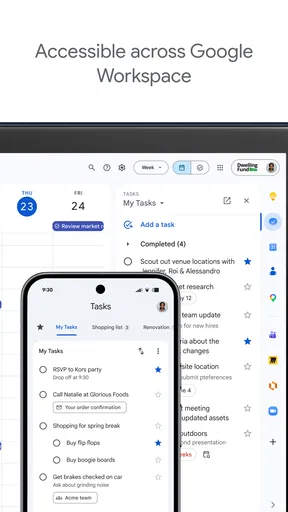
Now, right off the bat, what I love about Google Tasks is its simplicity. No frills, no unnecessary features – just a straightforward interface that lets you jot down your tasks with ease. It's basically like having a digital sticky note, but way cooler and more organized. The app is seamlessly integrated with Gmail and Google Calendar, so if you're already in the Google ecosystem, it feels like a natural extension.
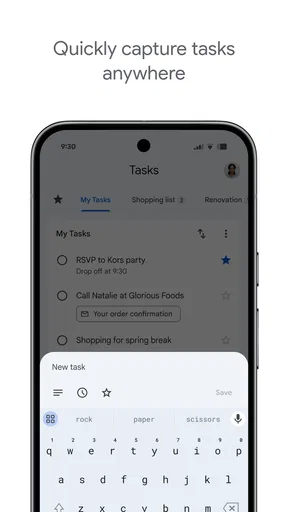
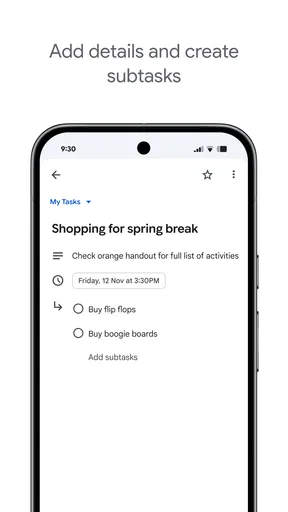
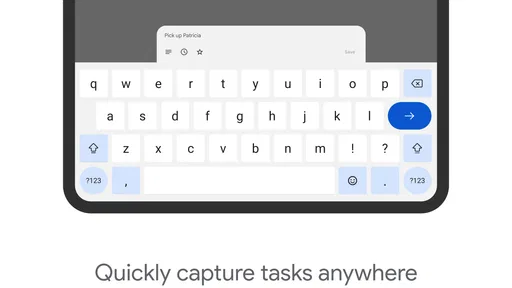
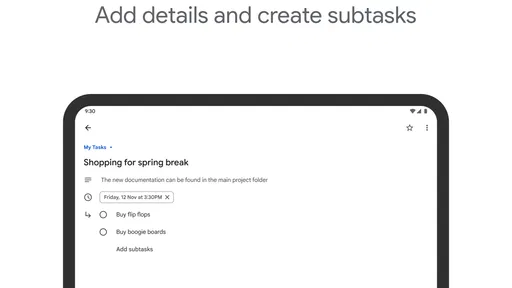
Setting up a task is as easy as pie. You just hit that little plus button, type in your task, and boom – it's there. You can add details, set due dates, and even create subtasks if you're feeling extra fancy. For someone who tends to overcomplicate things, the straightforward nature of this app is a breath of fresh air.
Integration That Works
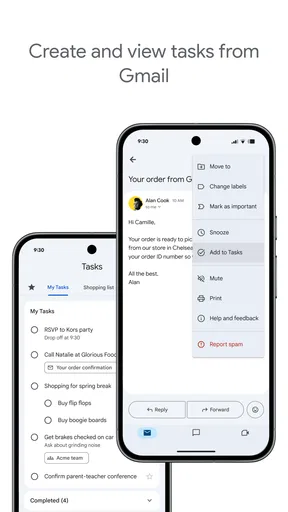
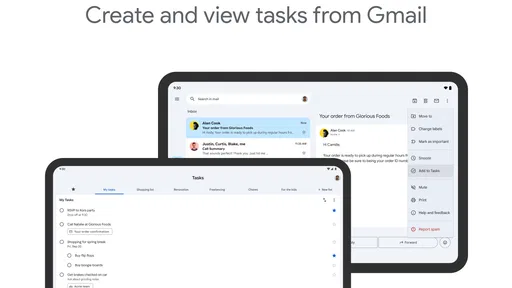
One of the standout features is its integration with other Google services. Picture this: you're reading an email in Gmail about a project due next week. With a few clicks, you can turn that email into a task without leaving your inbox. It's like magic, except it's just Google being Google, making life easier for us mere mortals.
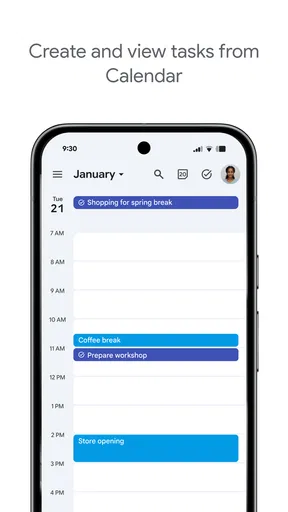
And then there's Google Calendar. I can't tell you how many times I've missed deadlines because I forgot about them. With Google Tasks, you can set deadlines that appear directly in your Calendar, ensuring you never miss another important date. It’s like having a personal assistant who gently nudges you with reminders but without the judgmental looks.
Mobile App Convenience
Let's not forget the mobile app. Available on both Android and iOS, it lets you take your to-do list on the go. Whether you're waiting in line for coffee or stuck in a meeting that could've been an email, you can effortlessly manage your tasks. The sync is fast, so whatever you update on your phone is instantly reflected on your computer. It's all about that seamless experience, folks.
The app’s design is clean and intuitive. No clutter, no unnecessary buttons – just a crisp, white interface that feels like a blank canvas for your productivity dreams. And for someone who gets distracted by shiny things, this minimal design keeps me focused on what truly matters: getting stuff done.
Making it work around the house
For a realistic household routine, I would use the list for the small jobs that otherwise get lost between messages: pick up a prescription, return a borrowed item, or remember to ask about an appointment. I would add a due date only when timing matters, then check the list while planning the day. That keeps the calendar for time-bound plans and the task list for actions, instead of filling every open space with reminders.
A useful habit is to write tasks so they begin with an action and include enough context to make sense later. “Call the dentist about Tuesday” is more helpful than “dentist,” especially when I am scanning the list in a hurry. Subtasks can break a larger job into steps—such as gather documents, complete a form, and send it—without requiring a separate project-management system. The trade-off is that this simplicity depends on the user keeping the list readable; it will not organize a sprawling plan for you.
Room for Improvement?
Now, as much as I adore this app, it's not without its quirks. For instance, it lacks some of the advanced features you'll find in other task managers. There's no tagging system, which could be a bummer if you're someone who loves categorizing tasks into neat little buckets. Also, while the integration with other Google services is top-notch, it doesn't play as nicely with non-Google apps. So if you're using, say, Outlook for work, you might find it a bit limiting.
That gap matters more as a list grows. If I need to filter dozens of items by project, assign ownership, or coordinate several people around shifting deadlines, a more structured task manager—or a shared household list app—would be a better fit. A paper list can even win for a short shopping trip when everyone is already together and nobody needs to sync changes. The right choice depends on whether I value quick capture or shared organization more.
For someone who uses Gmail and Calendar, a helpful habit is to convert only actionable email into a task. The message itself can be useful context, but turning every unread email into a to-do creates a second inbox and makes the list harder to trust. I would also review unfinished tasks at the end of the week: delete what no longer matters, rewrite vague items, and move genuine deadlines onto the calendar view. That small check-in keeps a simple tool useful without demanding elaborate maintenance.
But hey, if you're looking for something simple and effective, these are minor trade-offs. Plus, Google is always updating its apps, so who knows? Maybe those features are just around the corner.
Final Thoughts
In the grand scheme of productivity apps, Google Tasks might not have every bell and whistle, but it doesn't need them. Its strength lies in its simplicity and seamless integration with the Google ecosystem. For those of us who love a clean, no-nonsense approach to task management, it’s a winner.
So, if you're drowning in to-dos and need a lifeline, give it a whirl. It might just be the tool you need to turn chaos into calm. After all, who doesn't love a little order in their life?
My household verdict is straightforward: I would use it for my own errands and follow-ups, especially if Gmail and Calendar are already part of my day. I would not rely on it alone to coordinate chores across several people, or choose it for someone who needs detailed categories and project controls. With a 4.6 average, around 26,000 written reviews, a free price, and an Everyone rating, it is an approachable option for a personal task list. Its release was on April 24, 2018, and the core appeal remains the same: simple capture and useful Google connections, provided the account boundaries and shared responsibilities are clear.
Pros
- Seamless integration with Google services.
- User-friendly and intuitive interface.
- Supports multiple lists and tasks.
- Syncs across devices automatically.
- Free to use without ads.
Cons
- Limited features compared to competitors.
- No offline mode available.
- Lacks collaborative task sharing.
- Basic customization options.
- No recurring task functionality.
FAQs for Google Tasks
What is Google Tasks and how does it work?
Google Tasks is a task management app that integrates seamlessly with Google Workspace. It allows users to create, manage, and organize tasks directly from their Gmail or Calendar. Users can set due dates, add subtasks, and receive reminders, making it ideal for personal organization and productivity.
Is Google Tasks available on both Android and iOS devices?
Yes, Google Tasks is available for download on both Android and iOS platforms. The app can be easily downloaded from the Google Play Store for Android users and the Apple App Store for iOS users, ensuring a consistent experience across different devices.
Does Google Tasks integrate with other Google services?
Absolutely. Google Tasks is designed to work seamlessly with other Google services like Gmail and Google Calendar. Users can create tasks from emails, add due dates directly to their calendar, and manage everything in one place, enhancing productivity and workflow efficiency.
Can I use Google Tasks offline?
Google Tasks requires an internet connection to sync across devices. While you can view tasks that have already been synced, creating new tasks or making updates while offline will only reflect once you reconnect to the internet. This ensures that all your tasks are consistently up to date.
Is there a cost associated with using Google Tasks?
Google Tasks is free to use. There are no subscription fees or additional costs associated with downloading or using the app. It provides a cost-effective solution for individuals looking to organize tasks and increase productivity without financial investment.


